
Back to Ai PlugITs content page
"ChatGPT" PlugIT
Send requests to ChatGPT for generating textual responses or interpreting textual data within an OpenSpace3D project. This PlugIT is particularly useful for integrating conversational features, virtual assistants, or natural language processing tools into your interactive scenes.
Examples of use:
- Create a virtual assistant to answer user questions.
- Analyze text data in real-time.
- Generate dynamic descriptions to enhance user experiences.
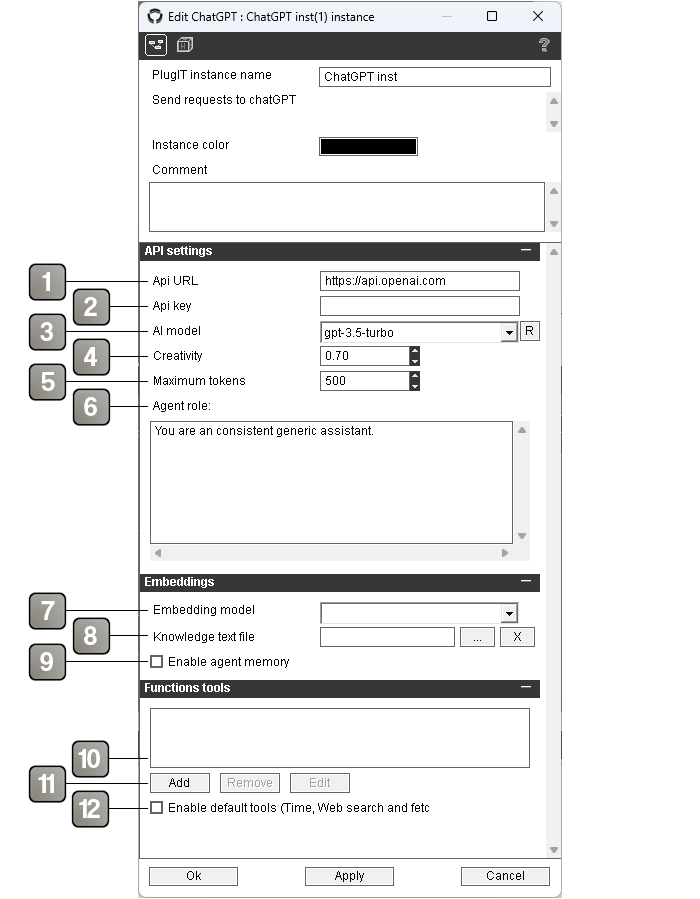
Parameters |
|
1 |
The API URL to send requests to ChatGPT. By default, use the official OpenAI endpoint ( |
2 |
The API key for authenticating with the ChatGPT service. Ensure the key is kept secure. |
3 |
The AI model to use for generating responses (e.g., |
4 |
The temperature setting for response generation, between 0 and 1. Lower values produce more deterministic responses, while higher values increase creativity. |
5 |
The maximum number of tokens (words, fragments) the AI can generate in a response. |
6 |
The role assigned to the AI within the conversation context, such as |
7 |
The AI embed model to compute vectors |
8 |
The text file that contains the knowledge of the agent |
9 |
Enable long term memory using the embedding model |
10 |
The list of defined tools. |
11 |
Add, Remove or edit a tool. |
12 |
Enable default tools (web search, web fetch, get time, get date, add / get memory). |
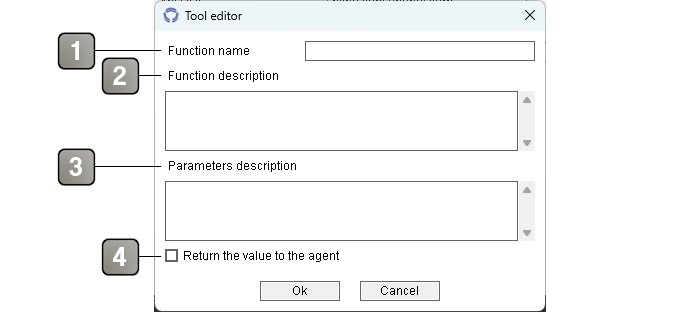
Tool editor |
|
1 |
Function name (Ex. SetCubePosition). |
2 |
Detailed function description (Ex. Sets the 3D position and orientation of a cube in 3D world, world unit is meter, this also returns the new position). |
3 |
Detailed function parameters (Ex. X Y Z position in floats, space separated and on a new line X Y Z orientation in degree). |
4 |
The function return a value to the AI agent. |
Actions |
|
Set max tokens |
Dynamically sets the maximum token limit for AI responses. Useful for controlling the length of outputs based on requirements. |
Set creativity |
Adjusts the temperature used for generating responses, influencing the balance between creativity and consistency. |
Set role |
Defines or updates the AI's role in the current context (e.g., |
Set model |
Selects a different AI model from the available options in the API (e.g., |
Set api key |
Updates the API key used for authentication with the service. |
Set api url |
Changes the API endpoint, useful for switching between different environments or servers. |
Reset history |
Resets the conversation history, useful for starting a new interaction without considering the previous context. |
Request |
Sends a request to the AI with the current context and retrieves a response. Used to initiate or continue a conversation. |
Describe picture |
Sends an image to receive a textual description. Useful for accessibility or automated analysis tasks. |
Single request |
Performs a one-time request without using conversation history. Ideal for standalone interactions. |
(Tool name) call |
The agent call a tool, this can be linked to the matching action. |
(Tool name) call |
The agent call a tool, this can be linked to the matching action. |
Reset memory |
Reset/empty the long term memory. |
Enable memory |
Enable the long term memory. |
Disable memory |
Disable the long term memory. |
Events |
|
AI model changed |
Triggered when the selected AI model is changed. |
Api Key changed |
Triggered when a new API key is set. |
Api Url changed |
Triggered when the API URL is updated. |
Requested input |
Triggered when user input is sent for processing. |
End stream |
Triggered when the AI's response stream ends. |
Response error |
Triggered when an error occurs during a request. |
Response stream |
Triggered as the response stream is received. |
Response |
Triggered when the AI has finished generating a complete response. |
Memory enabled |
Sent when memory is enabled. |
Memory disabled |
Sent when memory is disabled. |
Get picture |
Sent when the agent gives a picture data to show, it can be linked to Picture plugIT for example. |